The cottage internet looked excellent on a speed test and behaved badly whenever I needed to reach the place from somewhere else. The line was fast. The trouble was the extra box between that line and the network I actually used.
The fibre surprise
The new place in cottage country came with a surprise. In a place like this, you expect internet by DSL, by cellular modem, or by prayer. I budgeted for misery.
Instead, the place has 2.5-gigabit symmetric fibre. Canada spells fibre with an -re. I decided that this is the correct spelling. The line gives full multi-gig upload, in the woods, with loons all around. One speed test moved me from confusion, through suspicion, to joy.
The purpose of the upload
I had plans for that upload. The cottage would become a full node on the same private network as everything else we run: the Florida house, the servers, and my laptop wherever it is. That is the rule for the whole setup. Every machine can reach every other machine directly, over Tailscale, in any country.
The cottage has a small computer that runs its smart home. More work is planned for it: an exit node, and later a full clone of the home server. The clone means terabytes of replication that flow north. A symmetric multi-gig line makes all of that easy. On paper.
The Bell fiber box quietly wrecked that plan.
The bufferbloat detour
Bufferbloat sent me into the guts of the network. Bufferbloat is this: a connection is very fast on a speed test, but one upload makes the latency of every other device enormous. Under load, I measured round-trip times of 2.8 seconds.
I applied the textbook fix: a CAKE traffic shaper on the router. The shaper fixed the number. The 2.8 seconds became 284 milliseconds. The shaper also cut my 2.4-gigabit upload to 75 megabits. That cure is a guillotine for a headache.
I reverted it. The real cause was Wi-Fi saturation, not the fiber line. But by then, I was deep in the plumbing. There I found the problem that mattered.
Bell’s unit is an all-in-one box: modem, router, and Wi-Fi in one glossy shell. I run my own UniFi router behind it. That makes two routers in series. Each router does its own network address translation. That is double NAT.
Most people never notice double NAT. For normal outbound traffic, it causes no harm. Netflix works. Speed tests show the full rate. Nothing looks wrong.
Tailscale notices. Two machines on a private mesh connect directly by hole-punching. Both sides open a path through their routers at the same time and meet in the middle. One layer of NAT is fine. Two layers make the punching unreliable. Connections to the cottage could not always get through.
When hole-punching fails, Tailscale falls back to its relay servers. Tailscale calls them DERP. The traffic still arrives, and it stays encrypted. But the traffic takes a detour through a relay, not the direct path from machine to machine. The relay adds latency and puts a ceiling on throughput. A relay is the layover of the internet.
A relayed link is fine for a thermostat check. It is not fine for a scheduled push of a full server’s data. Inbound port-forwards just break. You cannot forward through a box that you do not control.
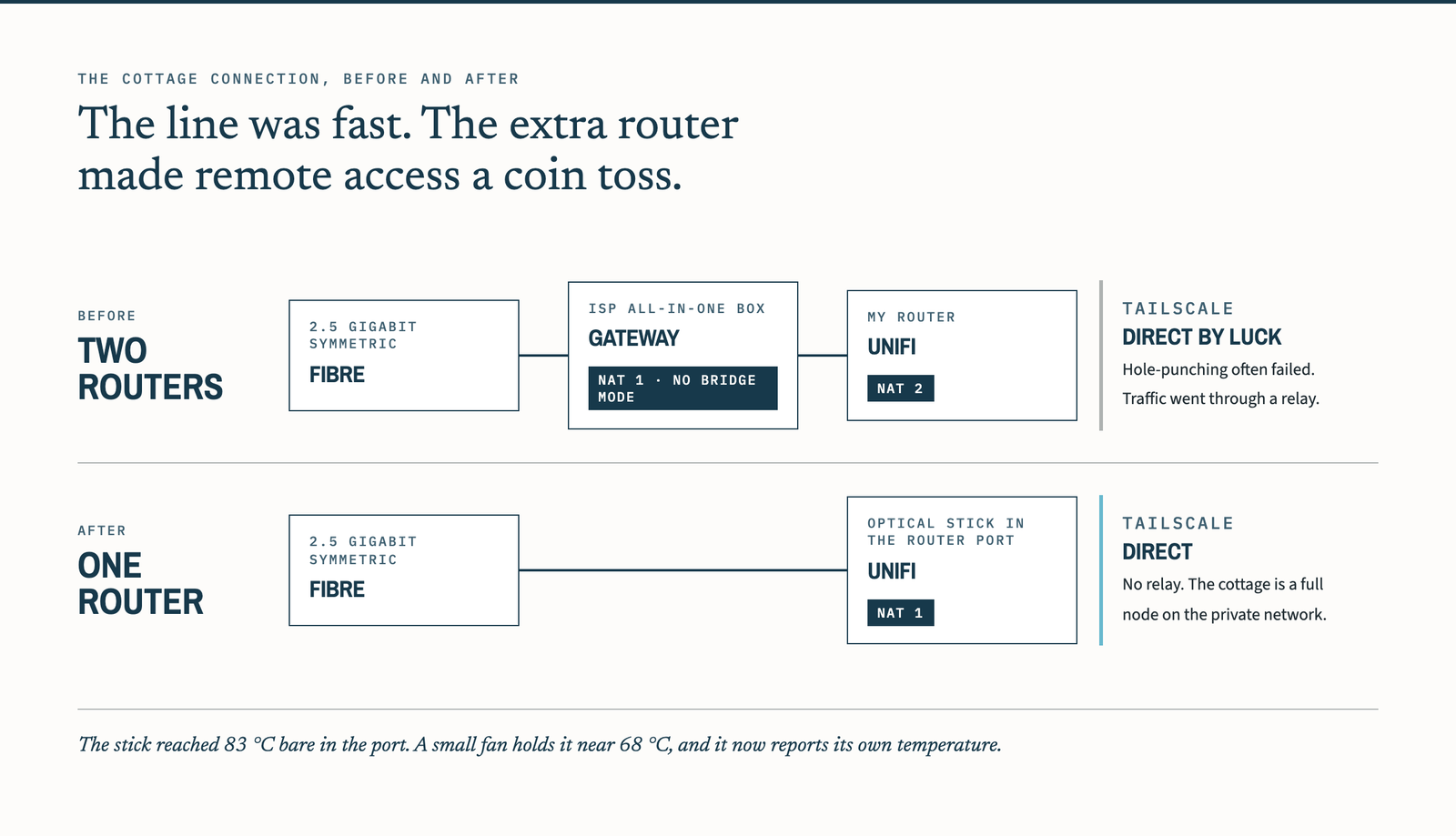
The inconsistency was the worst part. On some days, the connection was direct and fast. I have the note as proof. On other days, the connection used a relay. A link that is direct by luck is worse than a link that is reliably slow. You cannot build on it. Every future plan for that site got an asterisk.
No bridge mode
A grown-up router has a bridge mode. In bridge mode, the ISP’s box steps aside and passes the connection through untouched. Your own equipment then runs the show. Bridge mode is the polite, supported, five-minute fix for double NAT. I expected to click it on the day I found it.
Bell’s firmware has no such setting. The setting is not hidden. The setting is not unsupported. The setting is absent. I checked thoroughly. A line this good, ended in a box this stubborn, felt less like a limitation and more like an insult.
I assume there was a meeting. The theme that year was no bridge mode. Everybody clapped.
The remaining option was to retire the extra router and terminate the fibre at hardware my own router could use directly. I am deliberately leaving out the provider-identity procedure. It is specific to the service agreement and network, and it is not needed to understand what went wrong here.
The relevant design was ordinary: remove one routing layer, use credentials issued for the connection, and verify that the resulting path is direct before trusting it with anything important.
The cutover
The replacement hardware worked on the first try. It registered on the network seconds after the fibre went in. I want that on the record. Nothing else in the next four hours went that well.
Two of the most boring problems in networking ate the time. First: traffic to Bell must carry a specific VLAN tag. The stick or the router can apply the tag, but exactly one of them must do it. I configured the pair so that neither did.
My login requests left the router and disappeared. From the outside, this looked identical to a deep failure at the fiber layer. So I spent forty-five minutes on a diagnosis of the part that worked perfectly. One checkbox fixed it.
Second: the connection credentials. I started the cutover with a guessed username and an old password. The network said no, politely and repeatedly. I burned cutover cycles on permutations, like a person who tries an old locker combination on a new locker. To get the real credentials, I had to go through the provider. The phone tree has no button for that request, and the headache had the expected flavor.
That call should have been step zero, from the couch, days before the fiber moved. Instead, the missing credentials became a wall in the middle of the cutover. The request felt like a formality. The guess felt like progress.
Neither problem took the house offline. I did that myself. After each failed attempt, I moved the fiber back to the Bell box, so the household had internet. Then I moved the fiber back to the stick for the next try. I made about five swaps in one hour.
Bell’s street-side equipment has protections against exactly that flapping. Around swap four, it stopped trusting both devices. The household had no internet for about one hour. In that hour, I learned a fact about my router: the admin login needs a cloud service that the router could not reach. I finished the diagnosis on a neighbor’s Wi-Fi. That is a humble place for a network migration.
Attempt four had the correct tag and the issued credentials. The handshake completed. The double NAT was gone. Connections to the cottage went direct: no relay, no asterisk. The site went from “reachable, mostly, with caveats” to something I could depend on.
The stick runs hot
One lesson arrived after the victory lap. The stick runs hot. Bare in the router’s port, it reached 83 °C. That is inside the specification and spiritually on fire. A small spot fan brought it to 68 °C. A rack exhaust fan is the real fix, and I ordered one at about the moment I saw the first reading.
This is more than comfort. The stick must run for long stretches with no person nearby to power-cycle it. My remote access to the cottage rides the link that the stick provides. A heat death is not a degraded service. It is a burned drawbridge: no internet at the site, and no way in to fix it.
So the adapter now reports its own temperature. It sends an alert before it cooks. Small optical hardware is still a computer doing hard work in a metal slot with little ventilation. The forums rarely mention that part.
The technically difficult part worked first. The outage came from two ordinary facts I failed to confirm and my refusal to leave the fibre alone long enough to settle.
The next cutover checklist begins with the credentials and ends with fifteen quiet minutes. That is less interesting than the optical hardware. It is also the part most likely to keep somebody in the cottage from asking why the internet disappeared.